Reviewing finished tasks from last week in org-agenda and emacs
· last updated:
Being a PhD student within a research group entails some structure to tracking your progress as you proceed with research. Within the current team that I'm in, we have weekly group meetings where each member presents the tasks that they've completed during the previous week and discusses any issues they might've faced (if any), to our supervisor.
Usually before the meeting, I jot down things that I've finished with pen and paper. But since I'm in the spirit of integrating my workflow with emacs and orgmode, I thought why don't I try implementing this part of my routine also into orgmode.
Enter org-agenda
All my todo items are tracked with org-agenda where I capture every task I need to finish with org-capture[1].
I have a custom org-agenda view just for viewing my daily and weekly
TODO items, events/meetings scheduled at a certain time and tasks
that have a deadline associated with them. Suffice to say, this
workflow has replaced all my needs for having a calendar over the
cloud, be it Google, Outlook, what have you[2]. The only downside
that I haven't figured out (yet) is to incorporate calendar invites
that I receive via email, into my org-agenda automatically instead of
manually capturing an event into the agenda view.
With this custom agenda view, as I finish tasks and mark them DONE,
they disappear from the current view. This is by design. I figured I
could just review my completed tasks by visiting the relevant files
(tasks.org, meetings.org, etc. in my case). But who wants to sift
through all the completed tasks and filter them manually to only note
down the tasks completed during the previous week? Why not automate
this with the power of emacs?
Elisp snippet that implements this weekly review
The idea is fairly simple. I'd like to look at the tasks that I've completed since the last group meeting. This assumes I review these tasks on the day of the group meeting (which I do currently[3]).
We simply then instruct orgmode to filter out the DONE items from
the last 7 days. The org-agenda-custom-commands variable is what
we'll use to define this custom org-agenda view.
(setq org-agenda-custom-commands
      '(("w" "Finished tasks from last week" tags "CLOSED>=\"<-7d>\""
         ((org-agenda-overriding-header "Finished tasks from last week")
         (org-agenda-archives-mode t)
         (org-agenda-tag-filter-preset '("-emacs" "-personal" "-email"))
         (org-agenda-prefix-format '((tags . " ")))
         (org-agenda-remove-tags nil)))))
Let's go over the various config options one by one:
- The first line defines the keybinding in the primary org-agenda dashboard and the associated title for the keybinding.
tags "CLOSED>=\"<-7d>\""is pretty self-explanatory. We filter for items that were completed in the last 7 days.org-agenda-overriding-header: Simply defines the title of the agenda view.org-agenda-archives-mode: This is set tot(True) meaning to also look at the archived entries from last week. I typically archive my entries frequently so this is helpful.org-agenda-tag-filter-preset: I don't want personal tasks appearing in this view, so I remove any items that have the relevant tags.org-agenda-prefix-format: By default, the agenda view contains information about which file the entries belong to (in my case, it'stasks.org). This appears astasks:per entry in the agenda which unnecessarily clutters the view.org-agenda-remove-tags: I don't want to remove the tags of the various entries (they are useful to me) that appear in the right margin. Hence this variable is set tonil(False).
To invoke the view, we can simply run M-x org-agenda and hit w to
get into the view. My org-agenda dashboard looks like this:
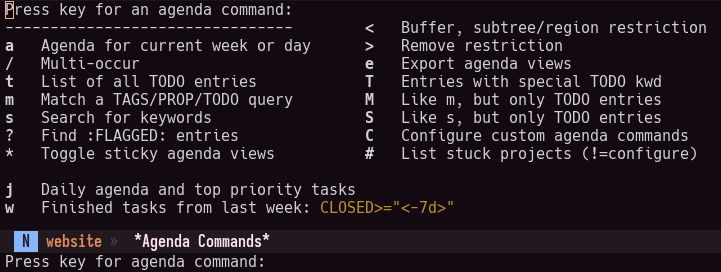
All the above keys are present in the default view, except my custom
views (depicted by j and w keys).
Invoking custom org-agenda views (slightly) faster
For my workflow, I mostly deal with just the two org-agenda views
(represented by j and w). It's a good idea to have a global
keybinding to quickly invoke these views. Let's define the function
and keybinding for it.
(defun pani/done-items-prev-week-org-agenda ()
  "Custom function to immediately jump to my custom org-agenda view."
  (interactive)
  (org-agenda nil "w"))
To invoke the function, we define the keybinding like via a use-package macro:
(use-package org-agenda
  :ensure nil
  ;; Don't need to go through org-agenda template for custom agenda
  :bind (:map global-map
          ("C-c w" . pani/done-items-prev-week-org-agenda)))
I can then just hit CTRL c w to bring up this new agenda view.
That's it! This should make things easier for me during our group's weekly meetings.